Stock Management Software for Complete Inventory Control
Manage stock across multiple godowns, track inward and outward movement, receive low-stock reorder warnings, and audit inventory offline or synced on PC and mobile.
What is stock management software and how do I download Likhtam?
Stock management software maintains real-time records of product quantities, item costs, and warehouse movements from supplier receipt to customer sale. Likhtam is accessible as an offline-first Android app on Google Play, a native Windows PC desktop installer, and directly via any web browser.
What Likhtam delivers for this workflow.
Real features engineered for real business operations, not generic templates.
Multi-Godown Stock Tracking
Maintain distinct inventory balances across multiple godowns, stores, and branches, with easy inter-godown transfer vouchers.
Low-Stock Reorder Warnings
Set minimum threshold levels for each SKU; Likhtam highlights items nearing exhaustion so you never run out of critical inventory.
Item-Wise Running Stock Register
Inspect complete historical movement for any product — opening balance, purchases, returns, sales, damages, and current on-hand stock.
Batch, Lot & Expiry Tracking
Group items by manufacturing lot and expiration date to prevent expired goods waste and enforce FEFO order fulfillment.
Stock Adjustments & Physical Count Audit
One-tap stock reconciliation vouchers to record physical count discrepancies, breakage, leakage, or shrinkage.
True Offline Operation & Desktop App
Work 100% offline with instant local responsiveness on your Windows PC or Android phone, with encrypted automatic cloud sync.
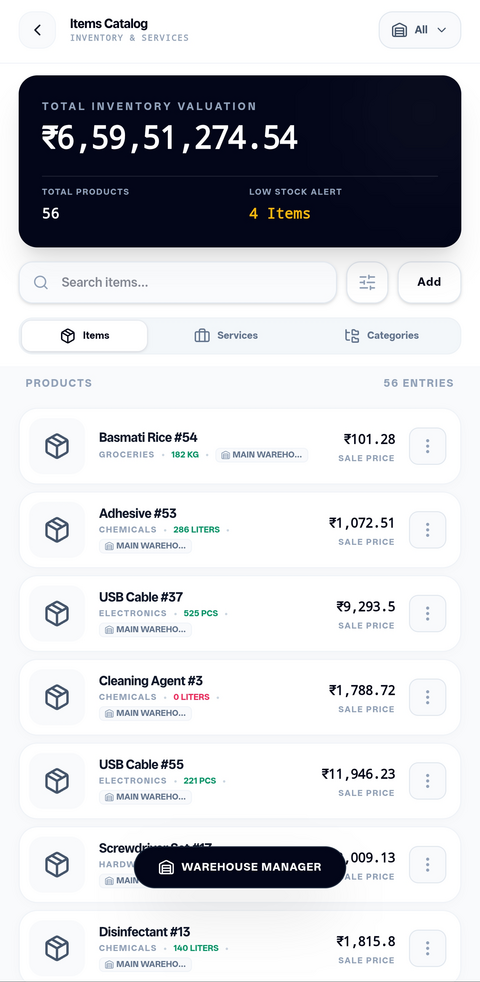
Live Product Likhtam stock management dashboard: real-time SKU levels, reorder alerts, and godown distribution
How it works from start to finish.
A clear, step-by-step process designed to keep your books completely balanced.
Record Goods Inward
Enter supplier purchase bills or inward delivery challans; stock levels increment automatically.
Allocate to Storage Locations
Assign incoming items to designated warehouse godowns or retail showroom racks.
Automatic Outward Deduction
Billing sales invoices, retail counter receipts, or delivery challans automatically decrements stock.
Monitor Low-Stock Alerts
Review the Reorder Report to generate timely supplier purchase orders for depleting items.
Periodic Stock Audit
Conduct physical inventory counts and log adjustments to keep software records 100% aligned with physical godowns.
Designed specifically for:
- Wholesale traders, stockists, and distributors managing fast-moving stock across multiple godowns
- Retail store owners needing instant barcode scanning, low-stock warnings, and real-time item counts
- Manufacturers tracking raw material procurement and finished goods inventory
Factual questions, straight answers.
Clear details about Likhtam's capabilities, offline support, and compliance.
Likhtam is available on multiple platforms: download the native Windows desktop application installer for your PC, install the Android app from the Google Play Store, or sign in directly through any web browser. Your local data remains available offline on your device.
Yes. On the Pro and Super plans, Likhtam supports multiple godowns and stock locations with inter-warehouse stock transfer vouchers.
Yes. The exact moment an invoice or point-of-sale receipt is recorded, the corresponding quantities are decremented from the designated godown balance.
Yes. Likhtam supports barcode scanning using handheld USB/Bluetooth laser scanners on desktop PC as well as camera-based scanning on mobile devices.
Ready to run your books with total clarity?
Free forever on your phone or PC. Optional cloud sync and multi-user access when you need it.